Personal finance software that lives on your computer
Compass is free, open-source personal finance software for Windows, with a macOS beta. You import the statements you already download from your bank, card issuer and brokerage, and Compass turns them into budgets, a cash-flow forecast, net worth and investment tracking. There's no account, no subscription and no bank login. Everything it builds stays in an encrypted database on your own disk.
Your money is spread across five places. Your attention isn't.
The banking app shows one account. The card app shows another. The brokerage has its own login, and the spreadsheet you meant to keep up stopped somewhere around March.
None of them tells you the thing you actually need to know: whether you're going to be short before the next paycheck lands. So you find out the usual way, when a payment bounces or a balance dips below zero and the fee shows up a few days later.
Then there's the slow leak. A streaming trial that rolled into a paid plan. A gym you haven't visited since spring. Each one is small enough to ignore on a single statement, and together they quietly take a real bite out of every year.
Every account in one app, plus the month ahead
Compass pulls your statements into one place and answers different questions on different pages. Here's what you get.
Overview: where you stand
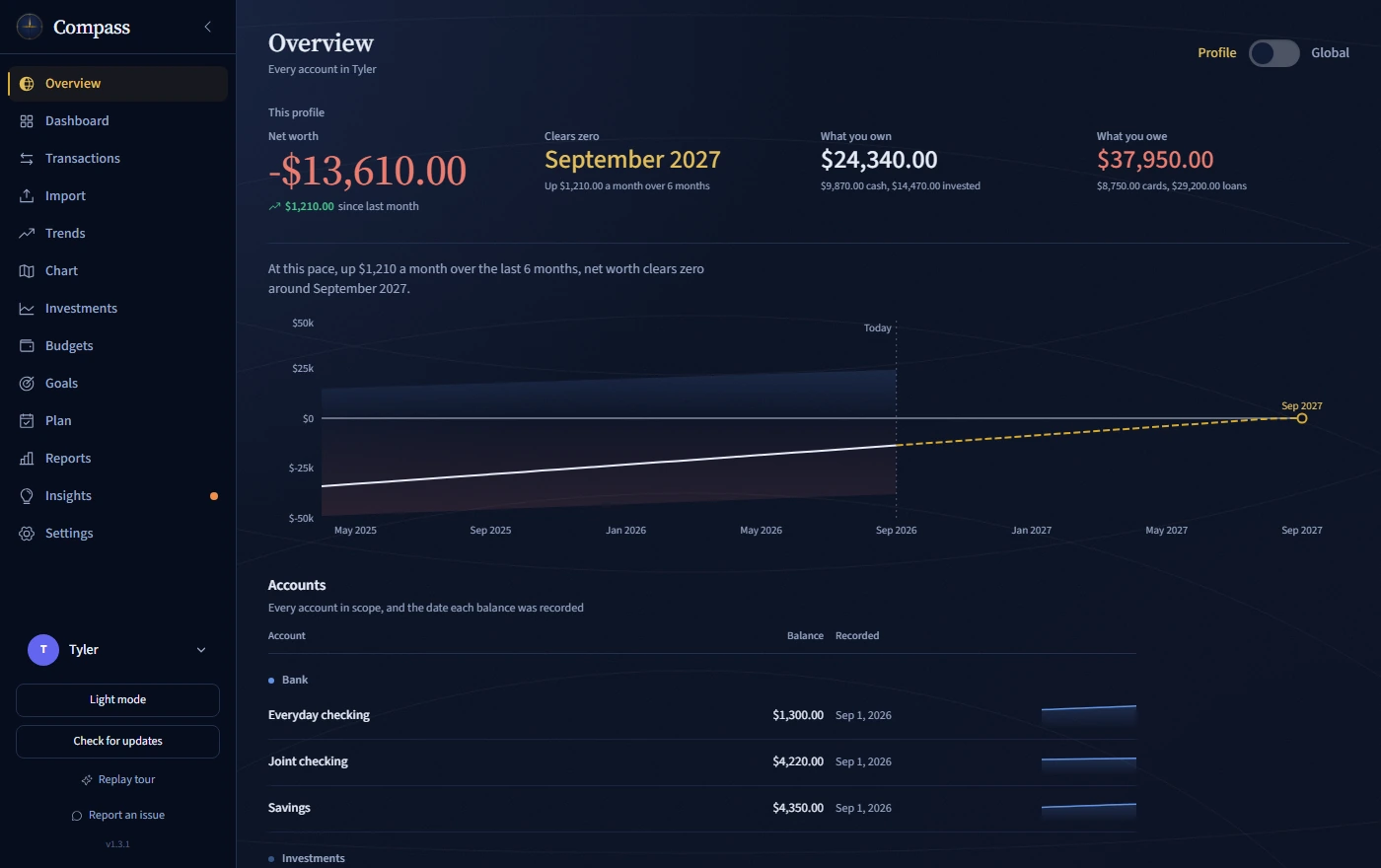
Net worth across every account, drawn as depth above and below a zero waterline. If you're below the line, Compass uses the pace you've actually been climbing at to project the month you clear zero. A table lists every account underneath.
Dashboard: how this month is going
Income, spending, what's still due and how this pay cycle compares with your own usual pace. Trend charts cover 3, 6 or 12 months, and you can move to any month, past or future.
Budgets and Goals: limits that warn you early
Set weekly or monthly limits, with optional rollover, and Compass projects whether you're on pace so you can catch an overspend before the month ends. Goals track savings, spending, balance or debt targets with progress bars.
Plan: what's safe to spend
Plan forecasts your spendable cash to the next paycheck from your bills, income and spending history. It shows a safe-to-spend figure and your projected lowest balance, and you can read the forecast as a line, a money map or a calendar where days turn amber below your cushion and red below zero. Try what-ifs, like a spending cut or a skipped paycheck, without writing a single transaction. For debt, it compares Avalanche, Snowball and Cash-flow First payoff orders side by side.
Insights: where the money is leaking
Health scores, a fixed-versus-flexible view of an average month, what your money cost or earned in interest, and action items ordered by the money at stake. The Ghost Subscription Detector flags charges with the same description and amount across two or more months and adds up their monthly and estimated yearly cost.
Investments: the rest of your net worth
Dated portfolio snapshots with allocation, holdings, income and gains. Compass reads exports from Wells Fargo Advisors, Fidelity and Thrivent, PDF statements from Principal 401(k) and E*TRADE / Morgan Stanley, and Ledger Live crypto operations exports. Support varies by institution and statement type.
Think of it as a personal finance companion that sits on your desktop instead of in someone else's cloud. How the import works is on the CSV budgeting page, and how your data is protected is on the private budgeting page.
Good to know before you install
Compass is a desktop app for Windows 10 and 11 (64-bit), with a macOS beta for 10.15 and later on Intel or Apple Silicon. There's no mobile app and no supported Linux build. It tracks a single currency. Forecasts need at least two months of imported history, and every figure depends on the statements you bring in, so check anything important against your bank. Compass is not financial advice.
Questions people ask
Is Compass really free?
Yes. Compass is MIT-licensed open source with no paid tier, no trial and no account to create. Donations are optional and don't buy extra features, because there's only one build.
Does Compass work on a Mac?
Yes, as a beta. The macOS build is a universal .dmg for macOS 10.15 or later on Intel or Apple Silicon. It isn't code-signed or notarized yet, so the first launch needs your approval in System Settings > Privacy & Security. The Windows installer is code-signed, with Chrysis Networks shown as the publisher.
Can Compass track investments and crypto?
Yes. The Investments page keeps dated portfolio snapshots with allocation, holdings, income and gains. It imports supported brokerage exports and PDF statements, plus Ledger Live crypto exports. Crypto holdings are valued at the price in the export, not a live price.
Can it forecast my cash flow?
Yes. Plan forecasts spendable cash to your next paycheck, with safe-to-spend, your projected lowest balance and what-if scenarios. It covers checking and debit accounts and needs at least two months of history.
Can two people keep separate finances in one install?
Yes. Profiles keep separate financial histories and can be locked with a PIN. Global views combine the profiles you've unlocked.
Is there a phone app?
No. Compass is desktop software for Windows, with a macOS beta.
See your whole month before it happens
Download Compass, open Demo Mode and look around with sample data. When you're ready, import your first statement.
Prefer to read first? Start with budgeting without a bank connection.